http://chris-lamb.co.uk/wp-content/2007/calendar2008.jpg

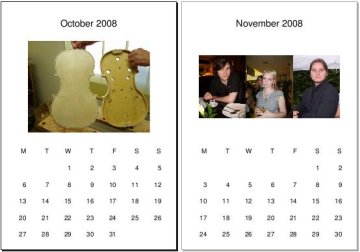
As an alternative to those Christmas "round robin" letters, my mum likes to create a calendar to send to relatives. This year, I rewrote the original crufty PHP script in Python:

usage:  pdfcalendar [options]

Generates a simple PDF calendar for the specified year, one page per month,
optionally using images in the specified directory.

To use images, use the --dir argument to specify a directory (or leave empty
to use the current directory) with the structure:

    |-- 01
    |   |-- s6000001.jpg
    |-- 02
    |   |-- s6000002.jpg
    |   \\-- s6000003.jpg
    |-- 03
    |   \\-- s6000004.jpg
    etc.

Images will be included on the appropriate month's page. If multiple images
for a month exist, they are tiled horizontally.

options:
  -h, --help            show this help message and exit
  -d DIR, --dir=DIR     Directory to source images (Default: '.')
  -y YEAR, --year=YEAR  Year of calendar (Default: next year)
  -o FILE, --output=FILE
                        Output file (Default: calendar.pdf)
  -q, --quiet           Don't print status messages to STDERR

GPL3+ source available in Git. Would love a patch that tiles images in a square if anyone has a spare moment.

§

Planets: ALUG UWCS WUGLUG Debian

§

18 comments

  1. Very neat. I need to figure out why it won't localized the calendar though. The calendar module is a bit vauge, but I think it is supposed to give a localized calendar.

    ulrik

  2. You could simply get a localized version if you add this patch:

    diff --git a/pdfcalendar b/pdfcalendar
    index eb28368..f13e44f 100755
    --- a/pdfcalendar
    +++ b/pdfcalendar
    @@ -24,6 +24,7 @@ import os.path
    import calendar
    import commands
    import tempfile
    +import locale

    from glob import glob
    from datetime import datetime
    @@ -72,6 +73,7 @@ def main():
    global options
    options, args = parser.parse_args()

    + locale.setlocale(locale.LC_ALL, '')
    try:
    images = find_images()
    return generate_calendar(images)

    anonymous

  3. I had <a href="http://git.chris-lamb.co.uk/?p=pdfcalendar.git;a=commitdiff;h=dc9c5dcd5b7ef7e3281b3ac1dc8b8d8540b4e67c" rel="nofollow">checked that into Git</a> a couple of minutes before you posted. Thanks anyway.

    — lamby

  4. Now localization works fine, thanks! I think I am going to use this, but then I'll still end up customizing a few things; the font, and then I'll try using two-letter day abbreviations, that's customary in swedish. I'll titlecase month names (the locale specifies lowercase month names, but in this case the names are free-standing meaning you titlecase them). I suspect this thing can't be generalized totally.

    ulrik

  5. Suggestion: week numbers.

    Ari

  6. Hay, this looks cool. I've tried running it but it comes back with an error, can any one help?

    <code>$ ./pdfcalendar --year=2008 --dir=images --output=test.pdf
    January...Traceback (most recent call last):
    File "./pdfcalendar", line 184, in ?
    sys.exit(main())
    File "./pdfcalendar", line 83, in main
    return generate_calendar(images)
    File "./pdfcalendar", line 174, in generate_calendar
    add_days(month)
    File "./pdfcalendar", line 120, in add_days
    for row_num, row in enumerate(calendar.monthcalendar(options.year, month + 1)):
    File "/usr/lib/python2.4/calendar.py", line 119, in monthcalendar
    day1, ndays = monthrange(year, month)
    File "/usr/lib/python2.4/calendar.py", line 112, in monthrange
    day1 = weekday(year, month, 1)
    File "/usr/lib/python2.4/calendar.py", line 105, in weekday
    return datetime.date(year, month, day).weekday()
    TypeError: an integer is required
    </code>

    james

  7. @james
    Oh, silly, I wasn't coercing the argument --year to an int. Fixed in Git, thanks.

    — lamby

  8. @ari
    Implemented yesterday (I think).

    — lamby

  9. Quick reply! :-)

    Just tried running ./pdfcalendar --year=2008 and it makes a calender but doesn't put images into it.

    Running ./pdfcalendar --year=2008 --dir=images
    gives another error.

    <code>
    January...Traceback (most recent call last):
    File "./pdfcalendar", line 184, in ?
    sys.exit(main())
    File "./pdfcalendar", line 83, in main
    return generate_calendar(images)
    File "./pdfcalendar", line 176, in generate_calendar
    add_images(images[month])
    File "./pdfcalendar", line 164, in add_images
    img = ImageReader(temp)
    File "/usr/lib/python2.4/site-packages/reportlab/lib/utils.py", line 532, in __init__
    self._image = PIL.Image.open(self.fp)
    File "/usr/lib/python2.4/site-packages/PIL/Image.py", line 1745, in open
    raise IOError("cannot identify image file")
    IOError: cannot identify image file fileName=/tmp/tmpu7kGXE
    </code>

    james

  10. @james
    Do you have Imagemagick installed? Try running ``% convert -version``.

    — lamby

  11. Good point... I forgot to install when rebuildy system.

    Running ./pdfcalendar --year=2008 --dir=images works
    but ./pdfcalendar --year=2008 does not put any images into the pdf

    james

  12. Forgot to say.
    It would be really good if there was some sort of header and footer on the pages.
    Would allow you to link back to a website/organisation that made the calender.

    james

  13. @james

    <code> -d DIR, --dir=DIR Directory to source images (Default: '.')</code>

    In other words, without ``--dir=images`` it will not look in your ``images/`` folder.

    Regarding, the header and footer, I've just implemented it and pushed it remotely.

    — lamby

  14. Some of my images seem to have names ending in JPG. I would suggest making it case insensitive in file endings or checking against lower-case version of filename, or adding JPG and JPEG to allowed file types.

    I used the latter solution.

    Thanks.

    Johan

  15. @Johan
    I was using ``glob`` which follows the case-sensitivity of your filesystem. I've rolled my own glob which is case insensitive now and pushed this update.

    — lamby

  16. Sorry, I didn't read enough...
    I assumed as there was a default images folder, it looked in there. Reading above it only looks in '.' by default. May be its worth changing the default to be the images dir.

    Header and foots are working well. :-) How difficult would it be to add a logo to the header?

    james

  17. @james
    Well, if you were running with the pdfcalendar binary somewhere in your PATH, then having to put things in an "images" folder as the default would be a little irritating IMHO.

    And a logo wouldn't be too complicated.. send me a patch!

    — lamby

  18. Hi
    Not sure where to start out with patching. I've not written any code before. But I know python is one of the easier ones. Any pointers?

    On another note, I've used a bunch of images (7MB in total) to make a calendar, but the calendar comes out to be 40MB! Any idea what that's all about?

    james

Reply

§